



Changing a web page’s URL is sometimes necessary, whether you’re restructuring a site, renaming a page, or migrating content. Done carelessly, it breaks every existing link and costs the page its search engine ranking. Apache’s redirection rules solve this: each rule flags the old URL, returns an HTTP 301 Moved Permanently response, and points to the new address, so visitors and search engines land in the right place. You define these rules in a .htaccess file.
A redirect loop happens when a redirected URL matches a rule that sends it right back to itself. At best, the loop eventually times out. At worst, it runs indefinitely. Here’s how to detect the problem, why it happens, and how to fix it.
This guide assumes a Kamatera server running Ubuntu with Apache already installed. For a detailed explanation of how to install Apache, see: Setting Up a LAMP Stack on Kamatera for Web Development, How to Install a LAMP Stack on Ubuntu.
What causes Apache redirect loops
Apache redirects pages with redirect or rewrite directives. A redirect rule replaces one URL:
Redirect "/shop/" "/products"
A rewrite rule takes all or part of the original URL and rewrites it as a new URL:
RewriteRule ^shop/(.*)$ /products/$1 [R=301,L]
Redirect loops result from two or more rules contradicting each other. Loops have a single cause, but multiple potential triggers. See the Fixing Apache redirect loops section for examples.
| Cause | Scenario | Explanation |
|---|---|---|
| Syntax errors | A simple redirection rule includes literal versions of both the source and target URL. More complex versions can combine multiple cases into a single redirect rule that matches recurring patterns.
No matter the rules’ content, it must be accurate and not contain errors that trigger loops. |
A syntax error could be as simple as getting the source or target parameters in a simple rule.
Complex rules that use regular expressions (RegEx) to match patterns in URL variations must avoid common errors, such as putting the start (^) and end anchors ($) or incorrectly using trailing slashes in a URL. Other errors come from missing or incorrectly used flags. For example, using the [L] flag to stop processing a rule instead of the [END] flag that halts processing all rules. |
| URL canonicalization | A canonical URL is a webpage’s official address. Canonical URLs evolve over time.
A site that wants to launch quickly may use the insecure HTTP protocol. As they grow and offer new services, such as ecommerce, that require security, they switch to HTTPS. In addition, if their URL doesn’t include the www prefix, they may decide to add it, or vice versa. |
Each change to a canonical URL adds another redirect. As the number of stages increases, the chance of creating contradictory rules rises. Going from HTTP to HTTPS, and in between, your site went from using the www prefix to removing it, which means you need rules that cover all these eventualities.
Each rule variation increases the chances that different rules will contradict each other. As you add more rules and stages, the greater the risk of triggering a loop |
| Rule order | Redirect rules are executed in the order they are defined. | Rules placed in the wrong order can easily contradict each other.
Suppose you have a rule that looks for a highly specific URL, followed by a general rule that applies to URLs, and they produce contradictory results; this can trigger a loop. |
| Duplication | Redirect rules can exist in multiple locations in a single file, as well as across multiple files on a file system or network. | You can define redirect files in Apache’s main configuration file /etc/apache2/apache2.conf, but that file could include multiple contradictory rules.
Apache .htaccess file lets you create specific rules for any HTML page located in /var/www/ or any of its subdirectories. As a result, you may have redundant rules that correct each other, or different rules in different files and directories that contradict each other. |
Detecting redirect loops
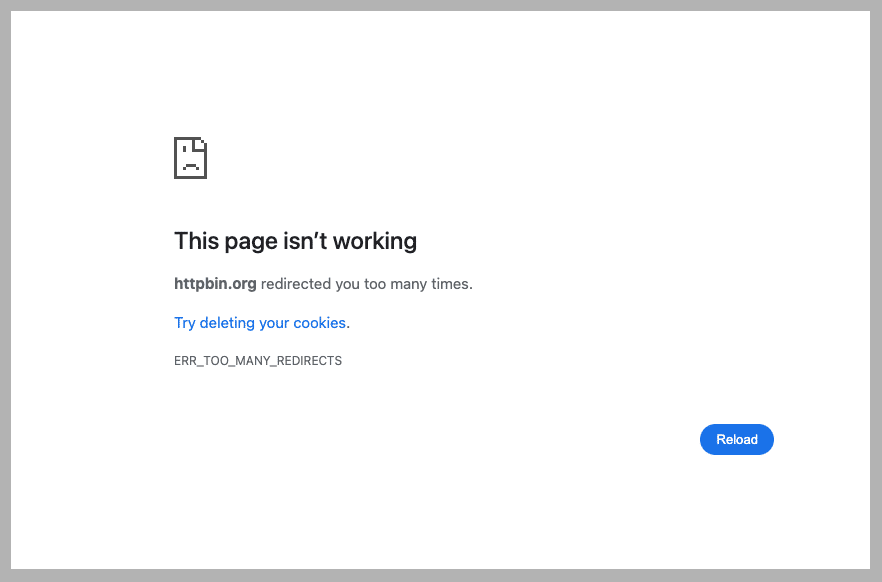
Before you can fix a redirect loop, you must check that you’re actually dealing with a redirect loop, and not a more common and easier-to-fix issue. To detect a loop, launch Chrome and enter the URL of the original page. If the page displays ERR_TOO_MANY_REDIRECTS, it’s stuck in a redirect loop.
Note: Non-Chrome-based browsers, such as Firefox or Safari, only display a page error and don’t support the ERR_TOO_MANY_REDIRECTS error message.
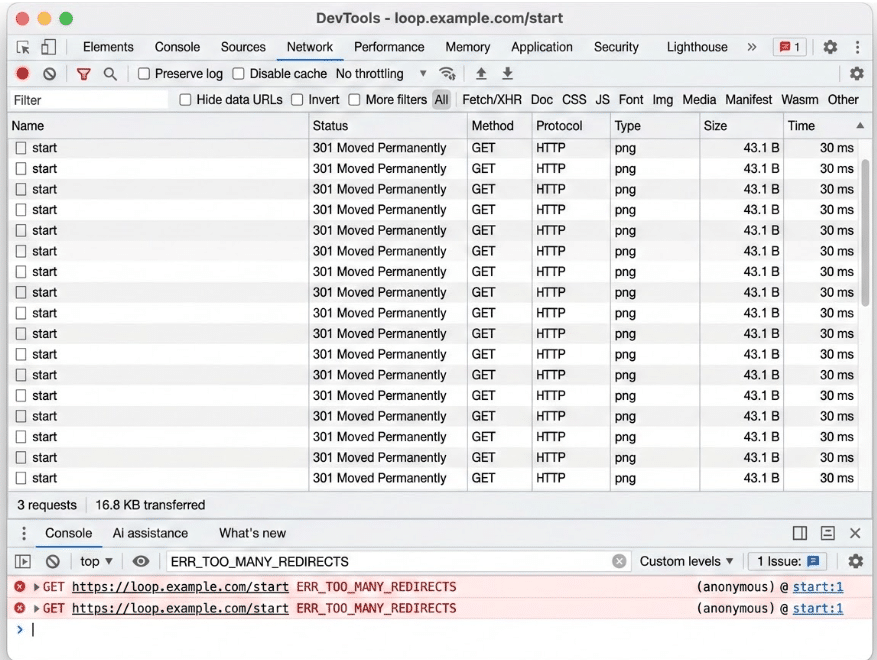
To get more information, open Chrome Developer Tools > Network. the console, search for ERR_TOO_MANY_REDIRECTS.
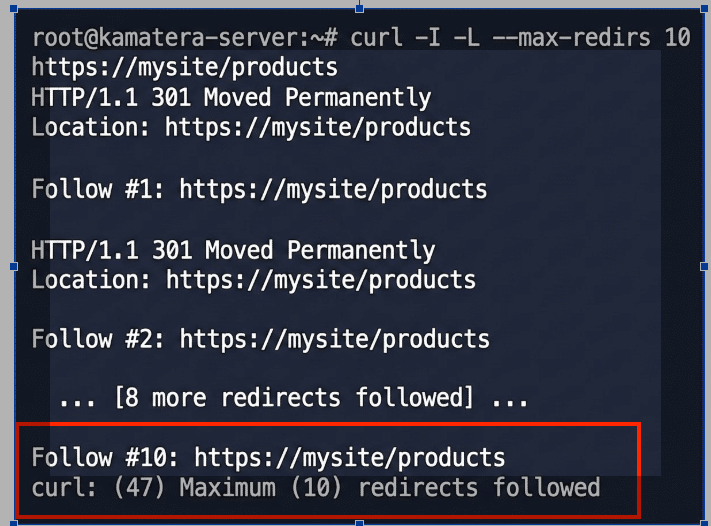
You can also detect the problem from the command line with CURL. Curl is a CLI tool that sends a request to a URL and shows you the response. Here’s how to use it to detect redirect loops:
curl -I -L --max-redirs <url>
Where –I returns the HTTP headers and status code, -L follows each redirect step,-– max-redirs <number> caps how many redirects curl will follow, and <url> is the website’s URL. In this example, we’re using CURL to test a site’s products page:
curl -I -L --max-redirs 10 https://mysite/products
Unlike Chrome, you won’t see the ERR_TOO_MANY_REDIRECTS message. Instead, CURL indicates that after it reached the 10 redirects limit we set, it continued to follow redirects until it reached its own limit of 47, a sure sign of a redirect loop.
Fixing Apache redirect loops
Once you know that you’ve detected a loop, let’s see how to fix it.
| Cause | Problem | Solution |
|---|---|---|
| Syntax errors | Source and target URLs are in the wrong place:
Redirect 301 https://example.com/new-page /old-page |
Swap them to correct the order:
Redirect 301 /old-page https://example.com/new-page |
| URL canonicalization | A rule that redirects to an HTTPS page without checking for the www prefix, followed by one that forces it to the final destination that uses it:
RewriteCond %{HTTPS} off RewriteRule ^(.*)$ https://%{HTTP_HOST}/$1 [R=301,L] A second rule redirects to HTTPS RewriteCond %{HTTP_HOST} !^www\. [NC] RewriteRule ^(.*)$ http://www.%{HTTP_HOST}/$1 [R=301,L] This redirects back to an incorrect HTTP version, or cycles between the two rules. |
Consolidating into a single rule that resolves the HTTPS protocol and the domain’s WWW prefix in a single step.
RewriteEngine On RewriteCond %{HTTPS} off [OR] RewriteCond %{HTTP_HOST} !^www\. [NC] RewriteRule ^ https://www.yourdomain.com%{REQUEST_URI} [L,R=301,NC] Use the [OR] conditions and a single RewriteRule to check for the protocol and domain prefix, and redirect to the canonical URL in one go without triggering a loop. |
| Rule order | The first rule matches any path, including /maintenance.html/.
RewriteRule ^(.*)$ /maintenance.html [R=302,L] Another rule’s [L] flag stops processing and redirects to /maintenance.html forever RewriteRule ^maintenance\.html$ – [L] |
Reversing the order lets the exception run first.
RewriteEngine On RewriteRule ^maintenance\.html$ – [L] RewriteRule ^(.*)$ /maintenance.html [R=302,L] |
| Duplication | When installing WordPress, an admin manually created a rule that enforces HTTPS in the site’s .htaccess file.
RewriteCond %{HTTPS} off RewriteRule ^(.*)$ https://%{HTTP_HOST}/$1 [R=301,L] A user installs a security plugin that duplicates the original rule. RewriteCond %{SERVER_PORT} 80 RewriteRule ^(.*)$ https://%{HTTP_HOST}/$1 [R=301,L] The two rules contradict and trigger a loop. |
Locate and remove the duplicate rule:
RewriteCond %{HTTP:X-Forwarded-Proto} !https RewriteRule ^(.*)$ https://%{HTTP_HOST}/$1 [R=301,L] |
Conclusion
Redirect loops usually come from more than just a stray rule in one file. They can build up from rule sets that grow inconsistent over time, but they also come from interactions between .htaccess, virtual host configuration, application-level redirects, reverse proxies or CDNs, and HTTP-to-HTTPS or hostname canonicalization. The fix is often small once you’ve found the source: reorder a rule, drop a leading slash, or swap a flag. Catching it early keeps your pages indexable and your links working.