



As a Kamatera reseller, protecting your clients (and your own bottom line) from accidental high costs is a top priority. This article walks you through how to assign a maximum server price limit for each user account.
This powerful setting is a crucial safeguard: it prevents clients from inadvertently launching extremely expensive, high-resource virtual machines (VMs) that exceed their budget or your service agreement. By setting a hard limit on the hourly/monthly cost of any single server they create, you establish an effective guardrail that ensures cost control, prevents billing surprises, and builds client trust.
Let’s learn how to implement this important safety feature.
- From the administrative panel on the left side of the screen select “Permissions” > “Users.”
- Select the user from the User Management list and click “Edit,” located in the bottom right corner of the User Information window.
3. The Edit User pop-up will appear. Beside Max Server Price click the “Override” checkbox and enter the new price limit. Select “Update” when finished.
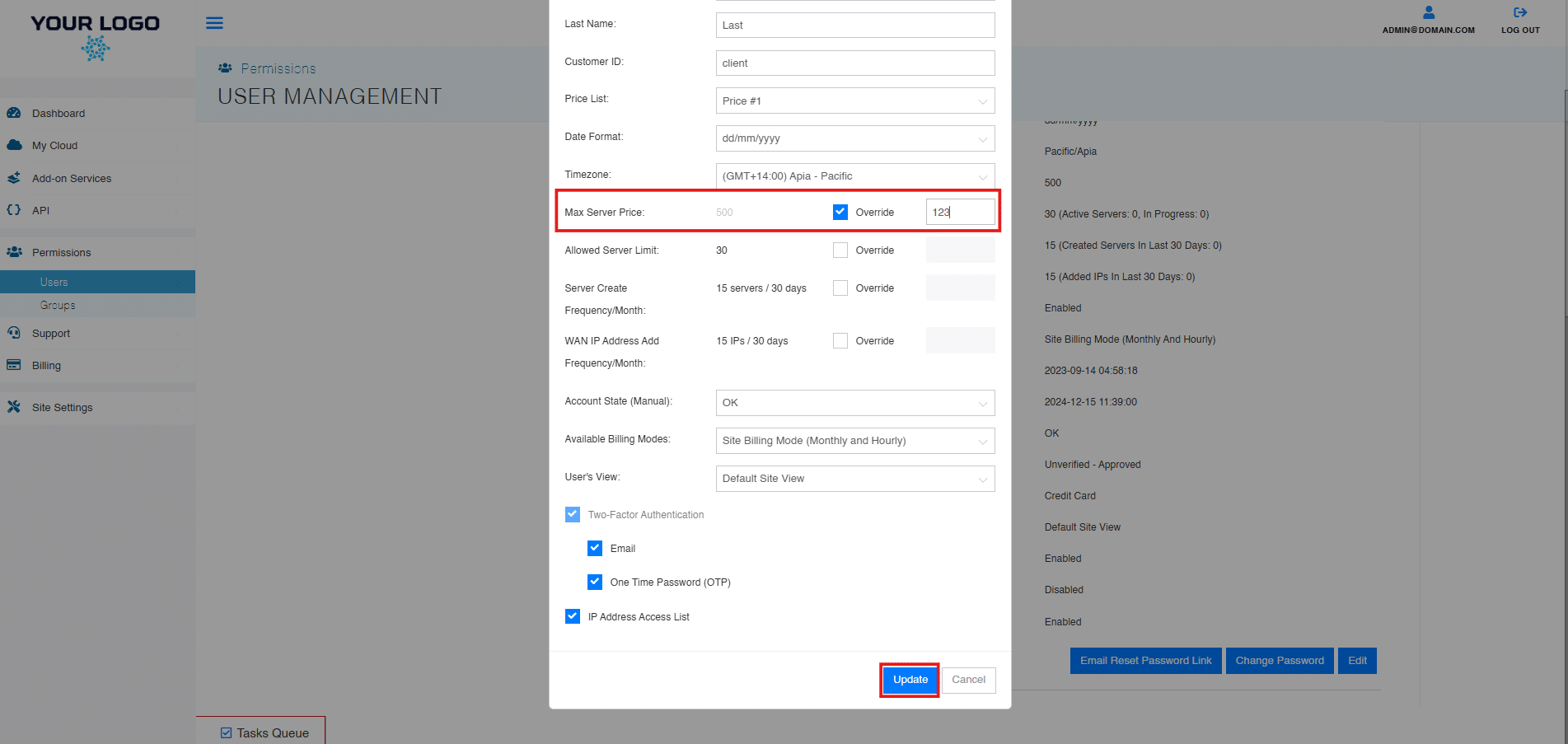
- The changes will now be reflected in the User Info Tab within User Management.
You’ve successfully learned how to implement the maximum server price limit for your users. This feature is an invaluable tool for both client retention and financial safety within your reseller program.