



As a Kamatera reseller, maintaining control over resource consumption is critical for managing costs and preventing unexpected overages. This article guides you through the process of setting a specific server creation allotment for your user accounts.
By assigning an allotment, you limit the maximum number of servers (VMs) a client can create under their profile. This feature is essential for two reasons: it ensures clients stay within the boundaries of their negotiated service package, and it provides an extra layer of cost control to protect your margins.
Let’s dive into setting these limits to keep your cloud environment predictable and profitable.
- From the administrative panel on the left side of the screen, select “Permissions” > “Users.”
- Select the user from the User Management list
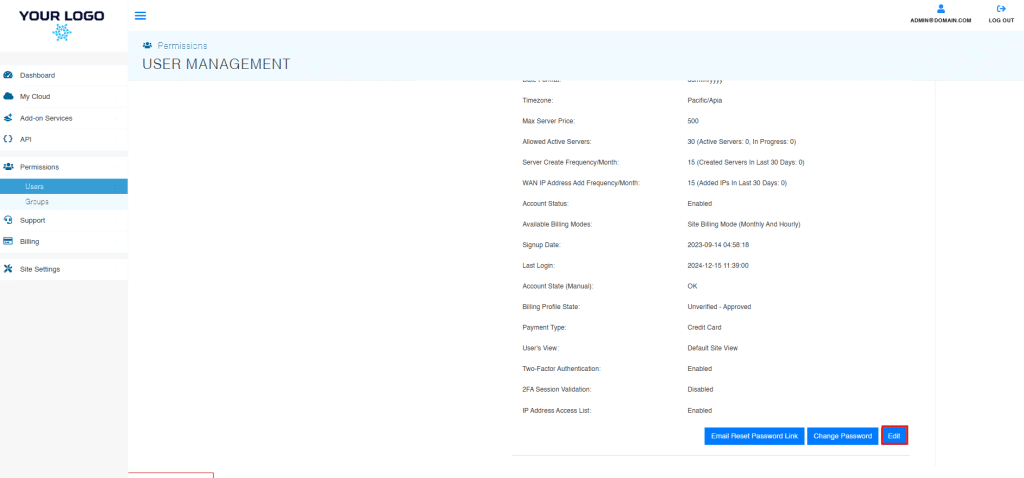
- click “Edit,” located in the bottom right corner of the User Information window.
3. The Edit User pop-up will appear. Beside Allowed Server Limit, click the “Override” checkbox and enter the new price limit. Select “Update” when finished.
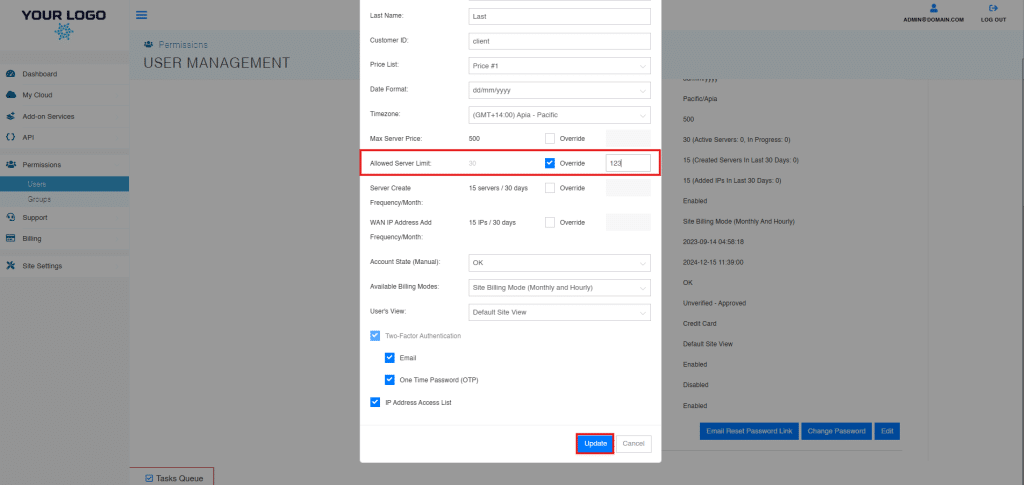
- The changes will now be reflected in the User Info Tab within User Management.
And that’s it! You have successfully learned how to assign and manage a user’s server creation allotment. This feature is a crucial component of financial control within your reseller operation.